Cohorts
A cohort is a collection of data records managed together within the Federated Learning Net Client. It provides a workspace for organizing data, configuring imports, inspecting records, and managing secure federated access. Each cohort is associated with a selected schema.
Schema and cohort
A schema and a cohort work together but play different roles. The schema describes what data looks like; the cohort holds the data. Select a tab to compare them.
A schema is a shared data contract defined on the Platform. It lists the variables a cohort can hold, what each one means, and which values are valid.
- Ontology node
- The concept behind a variable, such as body weight or diagnosis.
- Datatype node
- The value representation and rules, such as FLOAT in kg with MIN and MAX.
- Schema node
- Arranges variables into groups and marks single-value or list fields.
| Schema | Cohort | |
|---|---|---|
| Purpose | Data contract: variables, meaning, data types, and validation rules | Workspace that holds and manages patient records |
| Defined in | Federated Learning Net Platform | Federated Learning Net Client |
| Contains patient data | No | Yes, stored only in the Client |
| Created by | A Platform user with the required permissions | A Client user, by selecting an existing schema |
| Relationship | Can be used by many cohorts in many Clients | Is based on exactly one schema |
| Configured with | Ontology, datatype, and schema nodes | Connectors, records, queriability, access management, and members |
Because cohorts based on the same schema describe their data the same way, a federated query, statistics request, or training can address the same variable in every cohort. Each cohort still answers from its own records and under its own access and disclosure settings.
Schema building blocks
A schema is built from three node types.
An ontology node names a medical concept. Fields with the same ontology node mean the same thing, whatever they are called.
| Node | Defines | Example |
|---|---|---|
| Ontology | Meaning | Body Weight |
| Datatype | Value type and rules | FLOAT, 0–400 |
| Schema | Field position and number of values | Measurements → Body weight, single value |
Queries match fields by ontology and datatype, so cohorts on different schemas stay comparable where these nodes are shared.
Choosing a schema
Select a schema that covers the information in your data. Source data does not need to match it exactly: connectors can transform the data during import.
Schemas are created on the Federated Learning Net Platform by users with the required permissions, not in the Client.
Create a cohort
The Cohorts page displays existing cohorts and provides the New Cohort action.
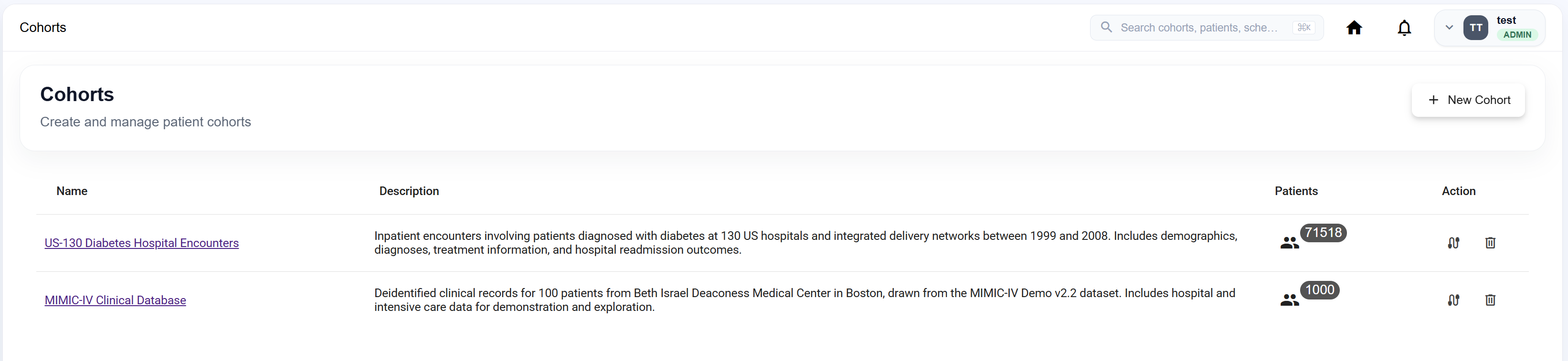
Create a cohort before adding data:
- Open Cohort in the Client and select New Cohort.
- Select an appropriate schema and click View.
- Review the cohort name and description, adjust them for your local use case, and select Create.
The new cohort provides a workspace associated with the selected schema. Creating it does not import data.
Manage a cohort
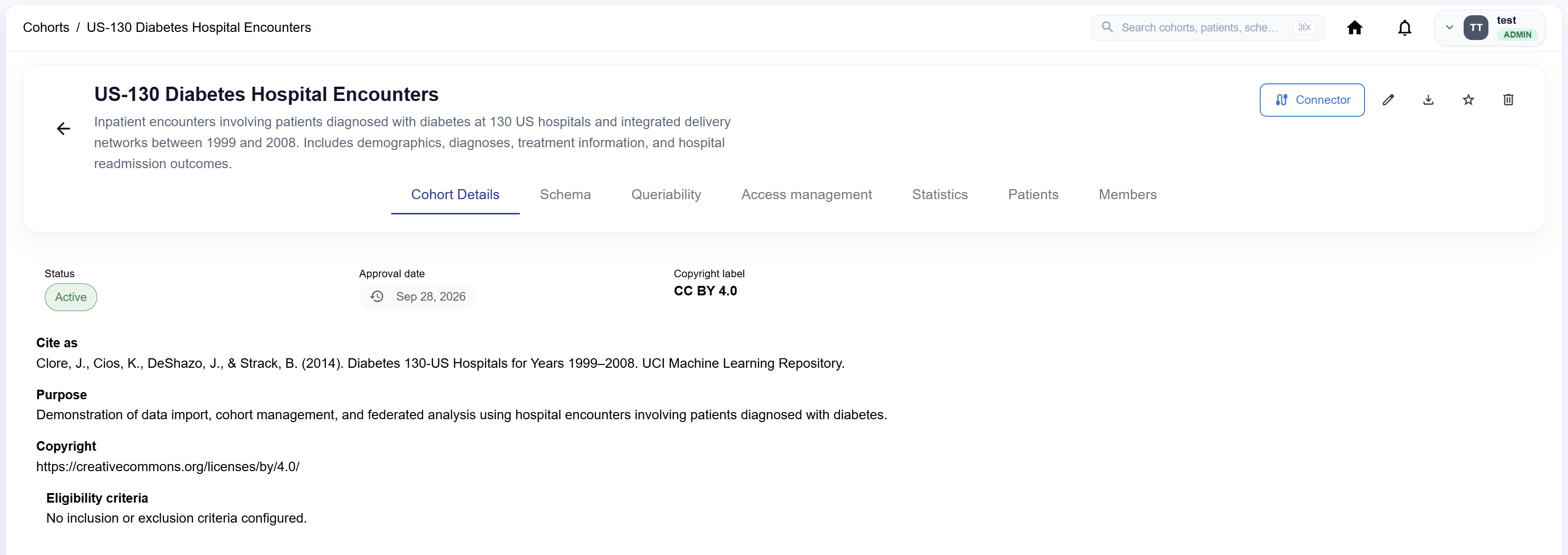
Select a cohort from the overview to open its workspace.
| Operation | Description |
|---|---|
| Review or edit cohort details | Open Cohort Details to review metadata, including status, purpose, citation, copyright information, and eligibility criteria. Use the cohort's edit action to update its details. |
| Inspect the schema | Open Schema to review the structure and definitions used for the cohort's data. |
| Federated access | Open Queriability to set, for each variable, whether a Federated Learning Net Platform user can query it and how. See the federated access documentation for more information. |
| Manage access | Open Access management to configure permissions and disclosure controls. See federated access settings. |
| Review statistics | Open Statistics to inspect summaries of the cohort's data. |
| Manage records | Open Patients to view, create, edit, or delete individual records. See manual record management. |
| Review cohort members | Open Members to review which other users of your client have access to the cohort. |
| Import or update data | Use Connector to configure imports and run them against the cohort. See adding data through connectors. |
| Export data | Use the download action to export cohort data. |
| Delete the cohort | Use the cohort's delete action to remove it from the Client. |
Allowing secured federated access from the network
Cohort permissions determine how data can be queried or used for statistics and federated analysis. See Requests for reviewing incoming requests, and Governance for access permissions and the management of accepted trainings.