Notifications
The Notifications page collects all messages, alerts, and updates from your Client, for example when a new training or statistics request is waiting for review.
Open Governance → Notifications to view them. The bell icon in the top bar shows the number of new notifications and gives quick access to them from any page.
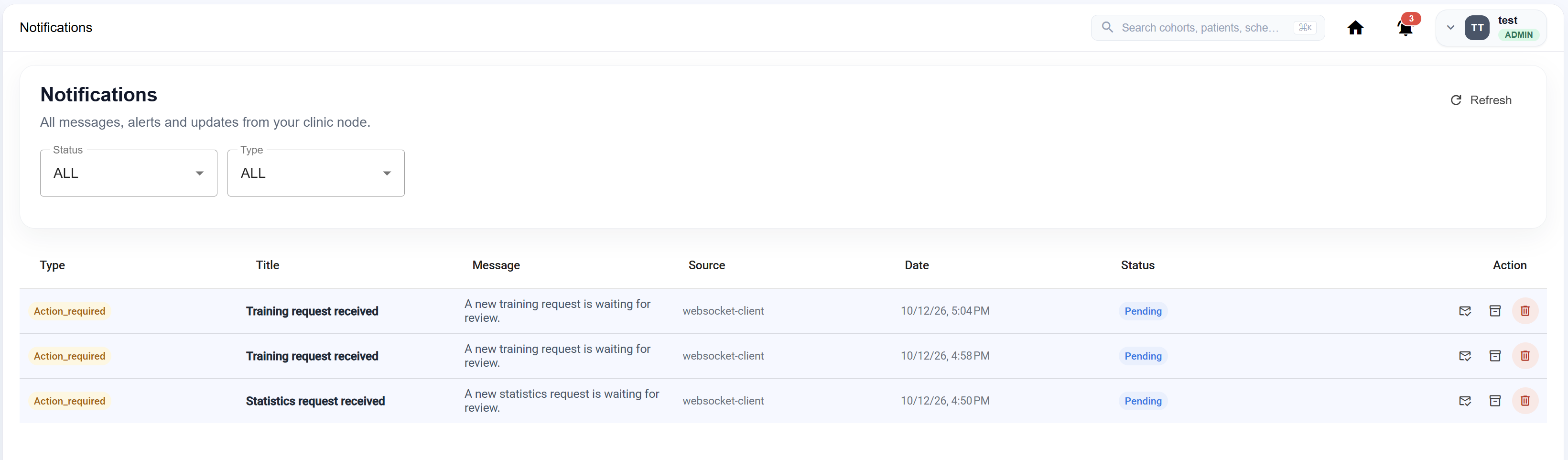
Filter the notifications
- Use Status to show only notifications with a specific status. Select
ALLto show every status. - Use Type to show only notifications of a specific type. Select
ALLto show every type. - Select Refresh to load the latest notifications.
Notification list
| Column | Description |
|---|---|
| Type | The kind of notification. Action_required means that someone must act, for example by reviewing a request. |
| Title | A short summary of the notification, for example Training request received. |
| Message | A description of the event and the action expected. |
| Source | The Client component that created the notification. |
| Date | The date and time the notification was created. |
| Status | The current state of the notification, for example Pending. |
| Action | Mark the notification as read, archive it, or delete it. |
Respond to a notification
Notifications only inform you about an event. To act on it, open the relevant page. For example, when a notification reports a new training or statistics request, review it in Training Requests or Statistics Requests.