Understand the Building-Pipeline
Why This Pipeline Exists
The pipeline is a centralized, controlled platform for providing and maintaining tools in a secure and reproducible way. And the pipeline is the only way a tool can be built and published.
There is no manual image upload. There is no local bypass. There is no hidden shortcut.
If a tool should become available to others, it must go through this pipeline.
And that’s intentional.
The pipeline guarantees:
- 🔒 Security validation
- 🧪 Runtime testing
- 🐳 Deterministic Docker builds
- 🛡 Vulnerability scanning
- 🦠 Malware detection
- 📊 Transparent reporting
- 👀 Visibility for other users
When a tool finishes the pipeline successfully, its metadata, security status, and build results are visible to other users.
The goal is simple:
Only verified, tested, reproducible, and secure tools should ever reach clinical environments.
Users never install tools manually. They simply select a tool, and the platform ensures that a validated container version is used, without requiring infrastructure changes or local setup.
How the Pipeline Works (Big Picture)
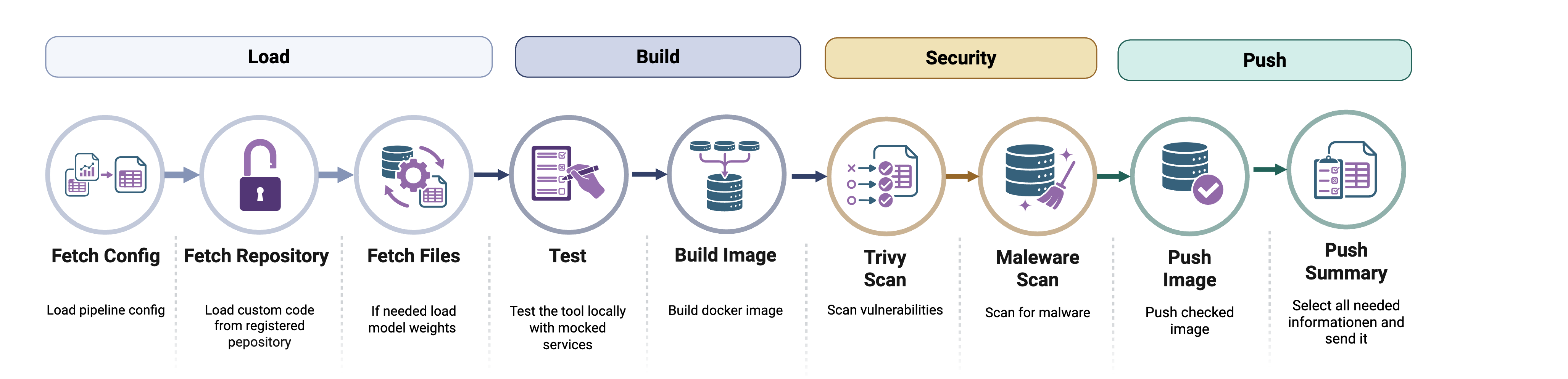
When the pipeline starts, it performs the following:
- Loads configuration
- Connects to the backend server
- Fetches pipeline metadata
- Executes each step in strict order
- Reports logs and status back to the server
- Exits with a clear success or failure code
FedNet does not rely on public container registries where anyone can upload arbitrary images.
Instead:
- Developers link a trusted public Git repository to their tool entry.
- The Federated Learning Net networks platform builds the container itself.
- The platform verifies the result.
- Only verified images are released.
- Released images are stored in the platform's own registry. Everyone can pull them, but only the pipeline can push, so nobody can replace a tool image afterwards.
This ensures:
- The container matches the published source code
- No hidden binaries are introduced
- No undocumented changes are included
- No malicious content enters the system
- Everything is automated, traceable and reported
The platform owns the entire build process, from specification to final image.
Pipeline Steps
Below is the exact order of execution. Each step has a clear purpose.
FETCH_CONFIG - "What exactly should I build?”
The pipeline first contacts the backend and asks:
What repository should I clone?
What image name should I build?
Which tag should I use?
This step retrieves:
- Git repository URL
- Commit/branch info
- Image name
- Image tag
- Registry configuration
- Additional metadata
Without this step, nothing else can run.
If this fails → the pipeline stops immediately.
CLONE_REPO - "Get the source code”
The repository is cloned into a fresh workspace.
Important behavior:
- Any previous workspace is deleted
- GitLab tokens are injected automatically (if required)
- The workspace is always clean and deterministic
This ensures reproducibility.
If cloning fails → pipeline stops.
FETCH_FILES - "Inject controlled files”
The backend may inject additional files, such as:
- Configuration templates
- Secrets
- Runtime wrappers
- Generated main.py
- Pipeline-specific helpers
Files are transferred base64-encoded and written into the workspace.
This is important because:
The server controls the execution environment.
Progress updates are streamed during this step.
If this fails → pipeline stops.
MALWARE_CHECK_REPO - "Is the repository safe?”
Before building anything, the entire repository is scanned using ClamAV.
What gets scanned:
- All source files
- Injected files
- Even the .git directory (unless configured otherwise)
If malware is detected:
- The pipeline fails immediately
- The tool cannot be built
- The error is reported to the server
This protects the system and other users.
This step is mandatory.
BUILD_IMAGE - "Build the Docker image”
Now Docker builds the image.
What happens:
- Optional Docker registry login
- Standard docker build
- Deterministic image name (derived from pipeline metadata)
- Tag is controlled by the server
No randomness. No local overrides.
If build fails → pipeline stops.
RUN_PYTEST - "Does the tool actually work?”
The pipeline runs:
pytest main.py
This executes real runtime validation.
If:
- Tests fail
- Assertions fail
- Exceptions occur
Then:
The pipeline stops.
This ensures the tool is not just buildable - it must also be executable and correct.
Mandatory step.
SCAN_IMAGE - "Is the image vulnerable?”
The built Docker image is scanned using Trivy.
It checks for:
HIGH and CRITICAL vulnerabilities
Results:
- Structured vulnerability summary
- Raw report
- Counts per severity
Important:
This step is allowed to fail for the moment, as in the current stage investigation in secure base images needs to take place
Meaning:
- The step is marked FAILED
- The vulnerability info is stored
- The pipeline continues
Why?
Because security information should be visible and not hidden.
Users will later see vulnerability details before using the tool.
PUSH_IMAGE - "Publish the image”
If everything mandatory succeeded, the image is pushed to the Tool registry of the Platform. Everyone can pull from it, only the pipeline can push.
The image name is:
- Fully deterministic
- Derived from pipeline metadata
- Globally unique per tool version
If push fails → pipeline fails.
COLLECT_SUMMARY - "Publish metadata for other users”
This step builds a final publish report.
It includes:
- Git commit hash
- Docker image name
- List of repository file links
- Vulnerability summary
- Malware scan result
This summary is uploaded to the server.
After this step:
The tool becomes visible and usable by others.
Failure Behavior - What Happens If Something Breaks?
The pipeline distinguishes between:
Mandatory Steps
Failure = immediate abort.
- FETCH_CONFIG
- CLONE_REPO
- FETCH_FILES
- MALWARE_CHECK_REPO
- BUILD_IMAGE
- RUN_PYTEST
- PUSH_IMAGE
- COLLECT_SUMMARY
Optional Steps
Failure = logged but pipeline continues.
- SCAN_IMAGE
All fatal errors result in:
- Container exit code 1
- Status update sent to backend
- Clear error logs
Reporting & Transparency
Complete transparency is one of the central design goals of the Federated Learning Net networks building pipeline. Each build is treated as a traceable, auditable process, not a black box. From the moment a pipeline begins until an image is finally published, each step reports its status, logs, progress, and potential error messages back to the backend. No important step happens silently, and nothing important disappears into temporary console output.
Each step reports to the server:
- Status: RUNNING / SUCCESS / FAILED
- Logs
- Progress
- Error message (if applicable)
This means that every build leaves a documented trail. If something fails, the reason is recorded. If a security scan detects vulnerabilities, the details are preserved. If a test does not pass, the exact failure can be reviewed. These records are helpful not only for debugging during development but also for maintaining the platform's integrity model. Administrators and developers can reconstruct exactly what happened during a build, including which source was used, which checks were applied, and why a specific version was accepted or rejected.
This transparency creates trust for users. They are not just downloading a container image from an opaque registry. Rather, they are using a tool whose origin, validation status, and security posture are documented and verifiable. For operators in clinical or research environments, this level of reporting is essential. It supports auditability, reproducibility, and compliance requirements by ensuring that every deployed artifact can be traced back to a controlled and documented build process, which is ideal for deploying high-quality applications in sensitive environments.
Summary
The building pipeline is more than just a technical automation component. It is a foundational security and quality mechanism that ensures only verified, reproducibly built tools are included in the ecosystem. The platform protects users from unverified code, hidden modifications, and insecure dependencies by centralizing the build process and strictly controlling how container images are created and published.
Each tool version moves through a fully automated, controlled workflow that begins with a trusted source repository and ends with a validated image in the central registry. Along the way, the tool is tested, scanned, and documented. Only after passing all required checks does the tool become available to others.
In practice, users can rely on the platform without worrying about installation complexity, inconsistent versions, or hidden security risks. Developers, in turn, benefit from a clear, structured process that ensures their tools are distributed safely and reproducibly. This approach transforms the tool explorer from a simple distribution mechanism into secure, curated infrastructure for deploying high-quality applications in sensitive environments.